Monitor AI visibility with n8n in five nodes
Monitor AI visibility with n8n: install the Heeb node, import one workflow, and get a Slack message when AI models stop mentioning your brand.

Monitor AI visibility with n8n and the whole job is five nodes: a weekly trigger, one Heeb query, a threshold, and a Slack message on each side of it. Heeb now ships an n8n community node, @heebai/n8n-nodes-heeb, so the query is a workflow step rather than wrapper code you maintain.
The workflow above is a file you can import: heeb-visibility-monitor.json. The rest of this post walks through it, from installing the node to reading the score, with one real result from heeb.ai at the end. There is also a second route that needs no community node at all, over MCP, at the bottom.
Why a scheduled check and not a one-off query
Every Heeb query calls each model live with its web search tool switched on. The model retrieves pages at that moment and writes a fresh answer, so the same prompt asked twice can return different brands in a different order. One query tells you where you stood at 14:32 on a Tuesday. It cannot tell you whether you are climbing or sliding.
That is the argument for the schedule. A single number is trivia. The same number every Monday is a trend line, and a drop in it is the earliest signal you get that a model has stopped recommending you.
Step 1: install the node
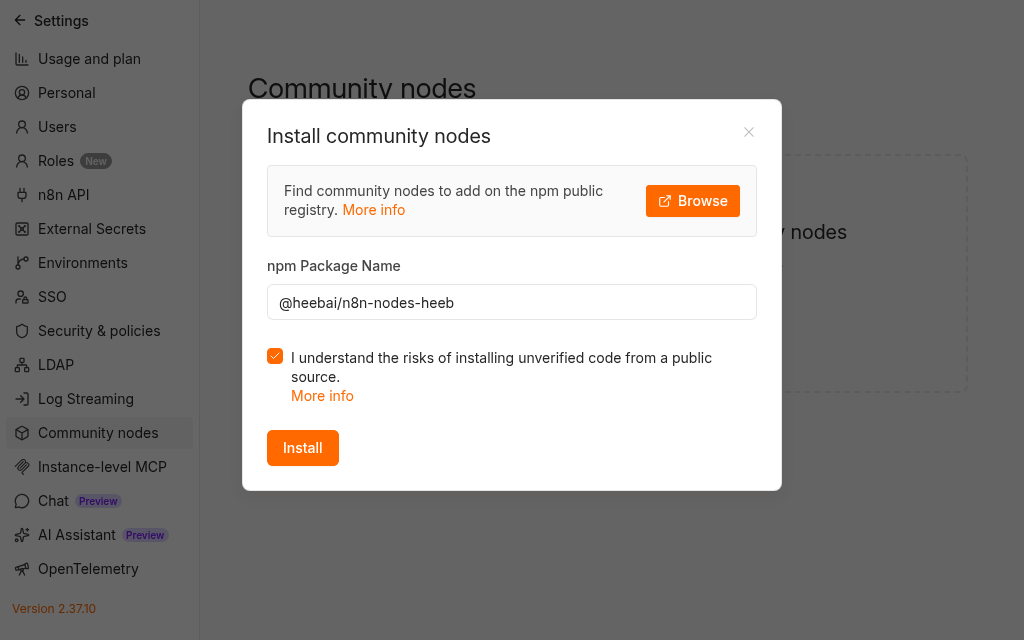
In your self-hosted n8n, open Settings, then Community Nodes, choose Install,
and enter @heebai/n8n-nodes-heeb.
Step 2: create the credential
Create an API key on the API keys page in your Heeb
dashboard. In n8n, add a Heeb API credential, paste the key, and leave Base
URL at https://heeb.ai. Save it. The credential test sends one lightweight
call and tells you straight away whether the key is accepted.

The key travels as the x-api-key header on every request, so the same key
works for curl, for the node, and for the MCP route below. The reference
version of these two steps, with every node parameter mapped to its API field,
is on the n8n integration page.
Step 3: import the workflow
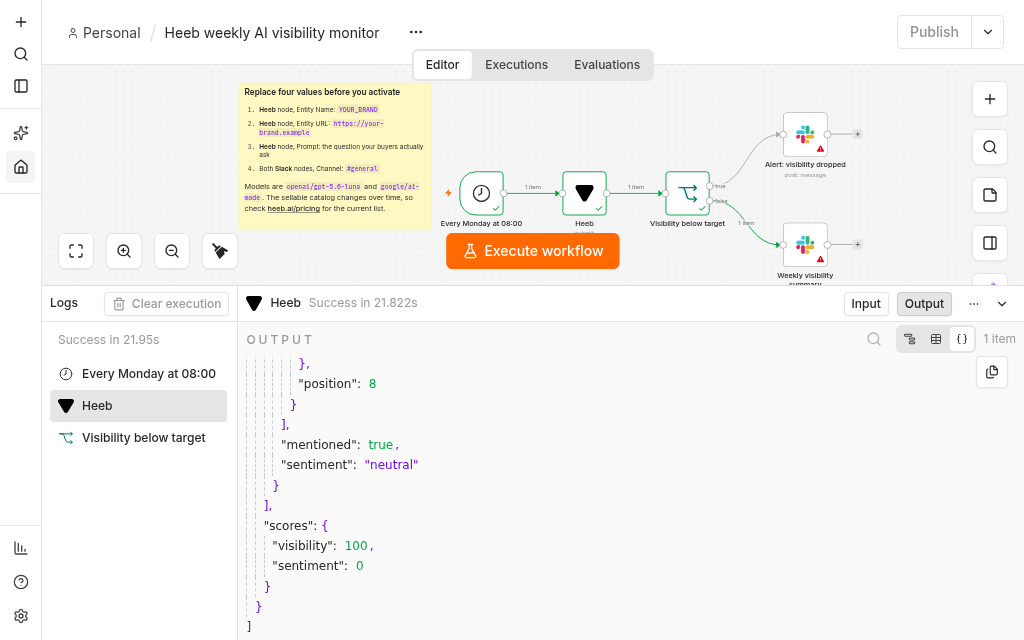
Download heeb-visibility-monitor.json and bring it in from the workflow menu with Import from File. Five nodes plus a sticky note land on the canvas:

The red warning triangles are the missing credentials, nothing else. Reading left to right:
Every Monday at 08:00 is a Schedule Trigger on a weekly interval, Monday, hour 8. Change the day and hour to suit your reporting rhythm. Weekly is the shortest cadence I would bother with, because a daily run mostly measures model noise.
Heeb submits the query and waits for the result.
Visibility below target is an IF node comparing
{{ $json.scores.visibility }} against 100. Anything under 100 takes the true
branch.

Alert: visibility dropped posts to Slack with the score, the prompt, the country, the combined sentiment, and which models actually mentioned you.
Weekly visibility summary is the false branch, and it posts to Slack too. A monitor that only speaks up on bad news is a monitor you stop trusting, because you cannot tell a healthy week from a broken workflow.
Both Slack nodes point at #general. Change that to the channel you watch.

Step 4: fill in your brand
Open the Heeb node. Every parameter arrives filled, so this step is four replacements, not a form:

- Prompt: swap the example for a question your buyers actually type.
- Entity Name: your brand. The URL is required and comes back in
entityon the response, but the matching is done on the name, so give the name the models would actually use. - Entity URL: your real URL.
- Models: two IDs, comma separated. The defaults are
openai/gpt-5.6-lunaandgoogle/ai-mode.
Leave Wait for Completion on. With it on the node polls
GET /api/query/{job_id} until the job settles and hands you the whole result.
Jobs settle in 30 seconds to 2 minutes, and the node's default timeout is 120
seconds, exactly the top of that range, which is why the workflow raises it to
180 with a 10 second poll interval.
Turning it off returns the job_id immediately instead, for the case where a
second workflow collects results later with the Get Result operation.
Step 5: read the result
Here is a real run against heeb.ai, using the request the API docs ship as their example. Trimmed to three mentions and one citation per model; the full response carried 7 and 8 mentions, 47 sources and 5 citations for luna, and 7 citations for AI Mode.
{
  "job_id": "01a076e2-e543-7347-8006-c5fd8372e874",
  "prompt": "what is the best football boots in 2025?",
  "location": "US",
  "entity": { "name": "Nike", "url": "https://nike.com" },
  "results": [
    {
      "model": "openai/gpt-5.6-luna",
      "status": "success",
      "mentioned": true,
      "sentiment": "neutral",
      "mentions": [
        { "entity": { "name": "adidas", "product": "Predator Elite" }, "position": 1 },
        { "entity": { "name": "Puma", "product": "Ultra 5 Ultimate" }, "position": 2 },
        { "entity": { "name": "Nike", "product": "Phantom GX 2 Elite" }, "position": 3 }
      ],
      "citations": [
        {
          "url": "https://www.goal.com/en-us/lists/best-mens-soccer-cleats/blt98e200f2a25b257e",
          "title": "The best soccer cleats you can buy in 2025 | Goal.com US"
        }
      ]
    },
    {
      "model": "google/ai-mode",
      "status": "success",
      "mentioned": true,
      "sentiment": "neutral",
      "mentions": [
        { "entity": { "name": "Nike", "product": "Hypervenom Phantom 1 Remake (2025)" }, "position": 1 },
        { "entity": { "name": "Adidas", "product": "Predator 25 Elite (FT / L-Tech)" }, "position": 2 },
        { "entity": { "name": "Adidas", "product": "F50 Elite" }, "position": 3 }
      ],
      "citations": [
        {
          "url": "https://www.soccerbible.com/performance/football-boots/2025/12/our-top-20-boots-of-2025/",
          "title": "Our Top 20 Boots Of 2025 - SoccerBible"
        }
      ]
    }
  ],
  "scores": { "visibility": 100, "sentiment": 0 }
}
Visibility 100, because both models named the entity. That fires the false branch and sends the weekly summary rather than the alert.
Read past the aggregate, though, and the two models disagree about how
prominent the brand is: AI Mode leads with it at position 1, luna puts it
third behind two rivals. Sentiment is 0 because both labels came back neutral,
which is the usual result for a listicle answer that describes products without
praising them.
That gap is the argument for the monitor. When I ran the same check for our own brand on the question we most want to win, visibility came back 0 and the alert branch would have fired.
One more detail in the payload is easy to miss: sources and citations are
separate arrays and providers do not fill both. AI Mode returned 7 citations
and no sources at all.
Step 6: turn it on
Activate the workflow. The Schedule Trigger fires the next Monday at 08:00 and one of the two Slack messages arrives. If you would rather not wait a week to see it work, hit Execute workflow once.
Reading visibility and sentiment
visibility runs from 0 to 100 and is the share of models that returned an
answer and mentioned the entity. It is a percentage of models, not a ranking
and not a traffic estimate.
The denominator is the models that answered, not the models you asked for,
which matters more than it sounds. If one of two models errors and the other
mentions you, the score is 100 and the healthy branch fires. Read results
alongside the score when a week looks suspiciously good.
With two models that both answer, the score can only ever be 0, 50 or 100. With four the steps are 25 points wide. So the threshold in the IF node is not a matter of taste: on a two model request, 100 is the only threshold that catches a single model dropping you. Add models and the right threshold moves with the model count, because what you want to catch is one model fewer than last week.
sentiment runs from -1 to 1 and is the mean of the per-model labels, with
positive counting as 1, neutral as 0 and negative as -1. Two models therefore
give you -1, -0.5, 0, 0.5 or 1 and nothing in between. A brand can sit at
visibility 100 and sentiment -0.5, which is the case you most want to know
about, because the models are recommending you and describing you badly at the
same time.
What it costs
Cost is per model call and it is all on the pricing page.
The model catalog changes under you
Model IDs retire. Heeb drops a model from the sellable catalog once its shutdown date has passed, and a request naming a retired model comes back with an error that names that date and points at the current list. Nothing silently substitutes a different model, which is the right behavior for a measurement product and an annoying one to discover from a failed workflow.
So do not treat the two IDs in the example as permanent. The live list is on
the pricing page, and the list_models tool below returns the same
list programmatically.
Without the node: the MCP route
The node is the direct path when you want scheduled monitoring on a fixed prompt. MCP is the path when you want an agent to decide when to measure and what to ask, and it needs no community node installed at all.
Heeb's MCP server is at https://heeb.ai/api/mcp and authenticates with the
same x-api-key header as the REST API. It registers three tools:
| Tool | Required arguments | What it does |
|---|---|---|
submit_query | models, prompt, entity | Queues a job and returns the job_id |
get_query_result | job_id | Returns pending, or the settled result |
list_models | none | The sellable model list |
In n8n, reach it with the MCP Client Tool node, which is a sub-node of the
AI Agent rather than a step of its own. Give it the endpoint URL above and a
header credential whose name is x-api-key and whose value is your key. The
node also supports bearer, multiple-header and OAuth2 auth, none of which Heeb
needs.
One nice property of the MCP route: submit_query publishes the current model
IDs as an enum in its own input schema, so an agent that reads the schema
cannot ask for a retired model in the first place.
FAQs
Where can I install the node? Self-hosted n8n, from Settings, then Community Nodes. Nothing in this post covers n8n Cloud.
How long does one run take? 30 seconds to 2 minutes for the job to settle. The node polls for you, so the workflow waits on its own.
Can I track competitors in the same workflow? Not in one request. The
entity is a single brand. Run the same prompt once per brand and compare the
scores, which is also how you get a share of voice number that means anything.
The mentions array does name the other brands the model ranked, as the real
result above shows, but only the entity you passed gets a mentioned flag.
What does the node do when the account cannot pay for a request? The API
returns a 400 with { "error": "Insufficient balance" }, and the node turns
that into a node error pointing you back at your dashboard. Turn on Continue On
Fail if you would rather collect the error than stop the run.
Can I send the results somewhere other than Slack? Yes. The Heeb node outputs plain JSON, so any node that writes to a sheet or a database takes it without extra work.

Written by Elias Vance
Ready to build your next AI app?